mirror of
https://github.com/Manoj-HV30/PhonoCoach.git
synced 2026-05-16 19:35:26 +00:00

86 lines
3.0 KiB
Markdown
86 lines
3.0 KiB
Markdown
## 1️⃣ PhonoCoach
|
||
Chrome extension with FastAPI backend for real-time pronunciation feedback using phoneme analysis leveraging OpenAI's whisper ASR model.
|
||
|
||
---
|
||
|
||
|
||
## 2️⃣ Getting Started
|
||
|
||
### Prerequisites
|
||
|
||
- **Python 3.12+**
|
||
- **pip**
|
||
- **Chrome browser**
|
||
- **ffmpeg** installed and available in your system PATH.
|
||
|
||
|
||
```bash
|
||
# a)Clone the Repository
|
||
git clone https://github.com/Manoj-HV30/phonocoach.git
|
||
cd phonocoach
|
||
# b)Create a virtual environment
|
||
python3 -m venv venv
|
||
|
||
### c)Activate the virtual environment
|
||
# Linux/macOS:
|
||
source venv/bin/activate
|
||
# Windows (PowerShell):
|
||
# venv\Scripts\Activate.ps1
|
||
|
||
# d)Install dependencies
|
||
pip install -r requirements.txt
|
||
|
||
# e)Start the FastAPI backend server
|
||
uvicorn backend.server:app --reload
|
||
```
|
||
### Load the Chrome Extension Locally
|
||
|
||
1. Open Chrome and go to `chrome://extensions/`
|
||
2. Enable **Developer mode** (toggle in the top-right)
|
||
3. Click **Load unpacked** and select the `frontend` folder inside the cloned repo
|
||
4. The **PhonoCoach** icon should appear in your toolbar
|
||
|
||
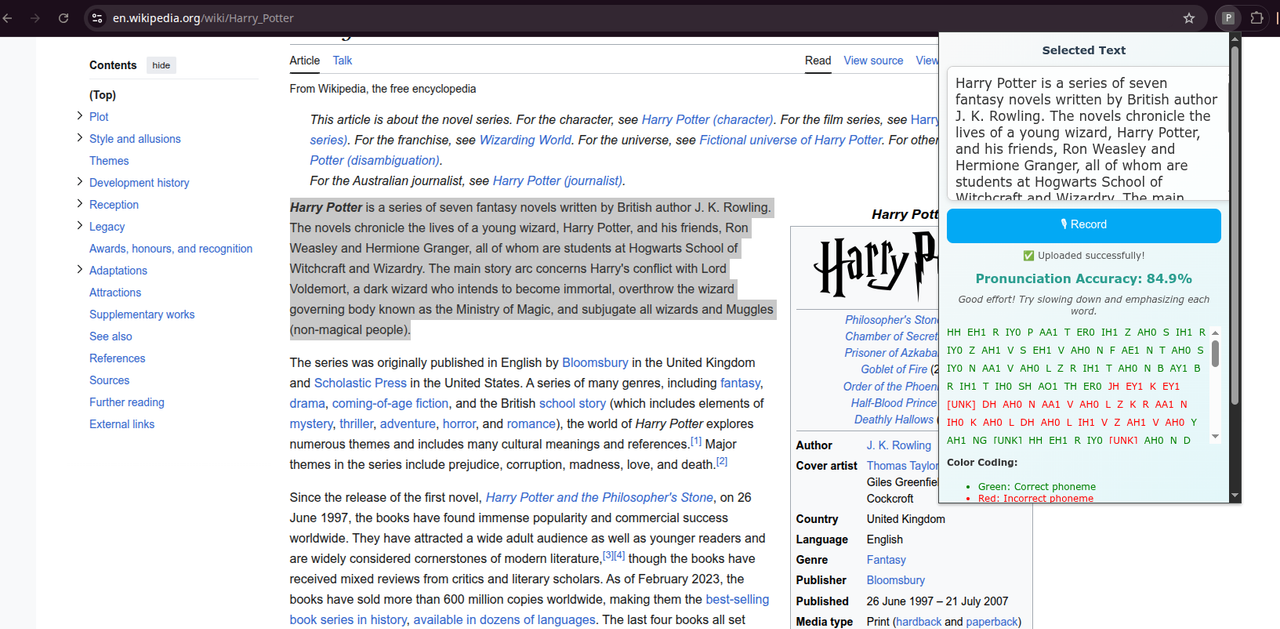
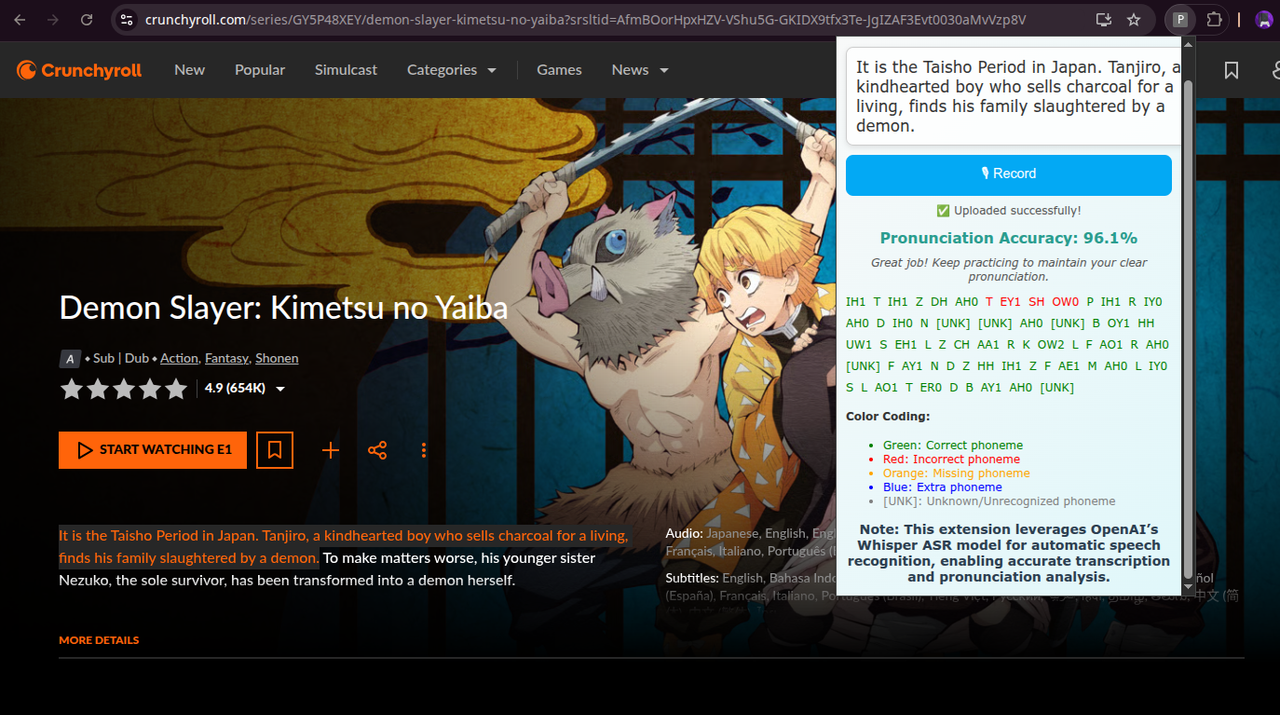
## 3️⃣ PhonoCoach in action
|
||
[](https://postimg.cc/VrnxpCTv)
|
||
[](https://postimg.cc/Vr7zDMbt)
|
||
### Using PhonoCoach
|
||
|
||
1. Select any text on a webpage.
|
||
2. Open the **PhonoCoach** popup.
|
||
3. Click **🎙 Record** to start recording your voice.
|
||
4. Click **Stop** to upload audio and analyze pronunciation.
|
||
5. View similarity score, phoneme-level feedback, and improvement tips.
|
||
## 4️⃣ Features
|
||
|
||
- Real-time pronunciation analysis for any selected text on any webpage
|
||
- Phoneme-level feedback highlighting correct, incorrect, missing, and extra sounds
|
||
- Similarity score to quantify pronunciation accuracy
|
||
- improvement tips based on your performance
|
||
- Uses OpenAI's Whisper ASR for accurate speech-to-text transcription
|
||
- Lightweight FastAPI backend for fast processing
|
||
|
||
|
||
|
||
## 5️⃣ Dev Notes
|
||
|
||
- Make sure the backend server is running before using the Chrome extension.
|
||
- Ensure `ffmpeg` is installed and accessible in your system PATH.
|
||
- The Chrome extension is loaded locally and is ***NOT YET PUBLISHED*** on the Web Store.
|
||
- In `backend/server.py`, the Whisper model `"small"` is loaded by default. Users can change it to other models based on their system’s processing power:
|
||
|
||
| Model | Approx. RAM Required | Recommended Use Case |
|
||
|---------|------------------|-------------------|
|
||
| tiny | ~1 GB | Low-resource machines, faster processing |
|
||
| base | ~2 GB | Lightweight, reasonable accuracy |
|
||
| small | ~4 GB | Default, good balance of speed and accuracy |
|
||
| medium | ~8 GB | Higher accuracy, slower processing |
|
||
| large | ~16+ GB | Maximum accuracy, requires powerful CPU/GPU |
|
||
|
||
- Users can adjust the model in `server.py` according to their available RAM and processing power.
|
||
```python
|
||
import whisper
|
||
|
||
# Change the model here:
|
||
# Options: "tiny", "base", "small", "medium", "large"
|
||
model = whisper.load_model("small")
|